Sunday, March 17, 2013

Guest blogger SLP For Me


Hello!  My name is Dana ‘SLP for ME’ and I have to first off thank Jessica, the amazing SLP and blogger, to invite me to guest post on her blog, Figuratively Speeching SLP.  I have been an SLP for 19 years now and I am always looking for new and innovative materials.   You will find if you ‘like’ my Facebook page SLP for ME, that there always is some wild and crazy therapy activities going on in my room!  It is ironically funny the name of this contest ‘Spring Fever Blog Hop’ with a froggie clip-art, because I find that my speech room is hopping lately (well all of the time if you know me, but MORE now then ever)!  In fact, I actually was feeling a bit like a frog yesterday because I was hopping around so much!  I probably feel this way because there is constant movement with hands-on, engaging and motivating activities.  I get bored very easily, almost to the point that I will plan different activities for every session of the day.  Where do I get the materials?  Well, I buy all of my manipulatives from the dollar store and the rest I make or buy from other SLPs on TPT.   My goals when creating materials are to ultimately design functional lessons that I want my students to walk away inspired and desiring to learn more about while developing components of their language and speech!  Right now, for example, my students are ‘traveling’ to different countries each day.  Today, we packed up our speech bags and traveled to Japan!  My students were required to follow instructions by manipulating new vocabulary pieces to complete a scene and respond to thinking questions about the country!  For each country, my students received an egg if they could recall three things about the country and then write a sentence or short paragraph about what they learned.  It is the greatest feeling when they ask, “Where are we going tomorrow?” And when I tell them that we do not have school tomorrow, that they are sad!!!  I just love what I do! 

Now for the contest freebie:  You will find that the contest freebie is the featured product in my TPT store SLP for ME: http://www.teacherspayteachers.com/Store/Slp-For-Me
It is annual review season for me, which is always a time for reflection.  Did I reach the goals of my students?  Can I boost them up a bit during the last three months of school before summer vacation?  I know that many of them are struggling with verbal problem solving and what to say in specific situations.  I was looking through materials that I inherited and they really made me laugh!  Again, I need to present my students with functional problem solving and not abstract concepts (that is a completely different goal for a completely different child) so I created the Swing Into Spring with Verbal Problem Solving.  I wrote the 24 scenarios, often comprised of a two-part question that the students can role-play and answer!  The situations are ones I hear about often while working in the schools, and acknowledge that my students have difficulty responding to, such as scenarios dealing with negotiating, problem solving, compromising, planning, etc.  Hope you enjoy the freebie and thank you for participating in the contest!  

Any question, please do not ever hesitate to contact me at:  chattywex@hotmail.com   Love you all my SLP friends! 
-------
Thanks Dana!
**Note:  Please scroll down to enter the giveaway to enter the giveaway.  Thanks for participating!
Jessica


Friday, March 15, 2013

App Review: You're the Storyteller: The Surprise


You’re the Storyteller: The Surprise Pro HD


By Hamaguchi Apps for Speech, Language & Auditory Development


iTunes Description:
You’re the storyteller! In this beautifully animated, wordless story, the child watches each scene and can then record and/or write their very own narration! **THIS IS THE PRO VERSION. It holds up to 30 users' narrations and writing. For a single user, please check out our Home Version.

In this delightful story, a boy brings home a stray dog and attempts to hide it from his mother. Using body language, facial expressions, and carefully selected sound effects, watch the story unfold and find out why it is called “The Surprise!”

There are 8 chapters in this story. Each chapter’s animation clips runs an average of 15 seconds, allowing the child to describe and retell the story in small increments. The user may replay the entire narrated story from beginning to end via the Table of Contents. You can also watch the original story with or without music accompaniment, email your story including the voice file, or print it out!

There are “Challenge Words” provided for each chapter. These are optional and for more advanced language learners who want to try and put them into their narration. The “Questions” bone provides 3 questions for each chapter. Answers and suggestions for both of these are available in the Information page.

This is the Professional version. Up to 30 users’ voice files and written narration is kept in the program. When a new recording or writing is provided for that user, it erases whatever was previously recorded or written for that user. 

Aside from being just plain FUN, this app lends itself well to a host of educational and therapeutic possibilities: practice with articulation, fluency, syntax development, social cognitive skills including perspective-taking and body language/facial expression interpretation, and much more!


PRIVACY POLICY: We do NOT collect personal data from our users and have no ads. Personal data regarding user performance on the tasks on this app are self-contained and not transmitted in any way, unless the user chooses to email them to someone else. There are no in-app purchases in this app. A demo link will allow a user with internet access to view a video on YouTube to learn about the features of this app, as well as a link to our other apps in the iTunes store.

Developed by noted speech-language pathologist and author of Childhood Speech, Language & Listening Problems: What Every Parent Should Know, Patti Hamaguchi, M.A., CCC-SLP.
To find out more about this app and our other upcoming projects, visit our website: www.hamaguchiapps.com
----------------------------------
This versatile app allows for so many speech and language goals to be addressed at once, including narrative development, formulating sentences, sequencing, pragmatic language skills, and vocabulary.  I have always enjoyed using wordless picture books, even with my older students, so when I saw this app, it was on my must-have list immediately.  In this app, you and your child (student) will watch the wonderfully animated scenes and then record a narration of them.  There are 8 different chapters or scenes.  I love the use of body language and facial expressions in the scenes.  My students have difficulty interpreting body language and facial expressions, so after each scene, we acted it out.  This helped them in taking on the perspective of the characters.  I had to tell my students that I wanted them to create a story to tell my children, in order to justify them using the app.  They really enjoyed it.  Each student narrated two scenes, and they liked hearing the whole story again once it was finished.  Also included in this app are challenge words you can use when narrating the story, and questions about each chapter.  There is also space on each page to type, so speech therapists have the option of addressing writing skills as well as verbal skills. 

I would definitely recommend this for use with younger and older kids.  It is highly engaging, and can even be used to obtain language samples.  

Jessica

App Review: Between the Lines Advanced

App Review: Between the Lines Advanced by Hamaguchi Apps for Speech, Language andAuditory Development


iTunes Description: Please see review below the description.

Hamaguchi Apps for Speech, Language & Auditory Develop presents a groundbreaking app for the iPad designed for adolescents and adults who would benefit from practice interpreting vocal intonation, facial expressions, body language, and idiomatic or slang expressions. Using real photographs, voices and short mini-video clips of a variety of social situations and expressions, this app provides a dynamic way to help learn and understand the messages that are “between the lines” and simply can’t be replicated with worksheets and static flashcards. American language and body language is used.

*THIS IS NOT A SOCIAL SKILLS MODELING APP. Some people say and do things that are rude, such as interrupt a conversation, say something that is insensitive, lie, etc. Adult coaching is suggested to supervise and provide input regarding situational language use.
 

For more information, watch a demo of this app on YouTube: http://www.youtube.com/watch?v=Y7uV5kMSjko&feature=plcp

For easier tasks, geared towards a slightly younger audience, check out Between the Lines Level 1 and Level 2 apps, also in the App store!

This app includes 65-75 tasks within each of the three activities. There are three distinct activities in this app:

1. Listening: The user hears a voice speak a sentence, e.g., “What did you DO?!” (Often the same phrase is heard spoken in several different ways throughout the activity, but with different emotion and inflection) The narrator asks, “Who said it?” The user is shown a series of photographs. The user touches the correct facial expression that matches the voice.

2. Body Language: A very short video-clip is shown that depicts an interaction or situation. For example, one teacher makes small talk then asks her colleague, “How is your day going so far?” The other teacher responds with body language only, suggesting “Eh
not bad, not good, just so-so.” The camera closes in this actor and says, “What is she thinking?” The user’s task is to look at the choices of responses and select the one that matches the facial expression/body language.

3. Expressions: A very short video-clip is shown that depicts an actor speaking a sentence that contains an idiomatic or slang expression, e.g., “I want to convince my dad to let me go, but I think I have my word ‘cut out for me’.” The user is then asked, “What does that mean?”A list of slightly cruder slang terms (e.g., "This is BS", "He's not the sharpest tool in the shed") are no longer in the default settings but can be specifically added within the Activity setting.

The game can be played by up to 75 users or as a group. The percentage correct is reported for each user’s performance on each of the three activities. Individual users can select their own settings; the group must have the same setting selections for the entire group.

Options included: Tracking progress (can be displayed or not) automatic advance or manual advance, choices can be automatically shown or manually displayed. Reward animations are provided at selected intervals for a welcome fun and break including Dunk Tank, Bull’s Eye (darts), and Shoot the Basket.These are not games of skill-just a fun diversion.

PRIVACY POLICY: We do NOT collect personal data from our users and have no ads. Personal data regarding user performance on the tasks on this app are self-contained and not transmitted in any way, unless the user chooses to email them to someone else. There are no in-app purchases in this app. A demo link will allow a user with internet access to view a video on YouTube to learn about the features of this app, as well as a link to our other apps in the iTunes store.

***Please check out the extension activities at the end of the Information Page, which is on the home page. It is also available on our website.

Developed by licensed speech-language pathologist and author, Patti Hamaguchi, M.A., CCC-SLP. Visit our website:
 www.hamaguchiapps.com 

----------------------------------------


Many of the students with whom I work have significant pragmatic language delays, so when I first heard about this app, I was very excited to test it out.  Since many of my students are older, I purchased the Advanced version, rather than Between the Lines 1 and 2.


My students really enjoyed this app.  When I inquired about what they liked the most, they liked that the graphics were not babyish, and they felt the situations focused on things that they could encounter in their daily lives.  Due to the short length of the videos, my students were able to act out the scenes that occurred, which helped them gain perspective into the feelings of others.    During the sessions we used it, my students were engaged; however, one aspect of this app was frustrating for them.  As soon as a correct response was entered, the app moved on to the next situation.  It would be wonderful if at some point there could be a pause button, which would allow for more in-depth discussion and analysis of the situations. *EDIT: A representative from the company contacted me to let me know that an individual may  now pause the app to allow for further discussion.  You can access this function in the settings menu.


I liked that this app allows for customization.  In the settings portion, you can choose to use each of the three activities, or focus on just one.  You can also choose the order in which they occur.  You can also decide how often encouragement is offered, the type of reward used (or not), how many choices offered per question (to increase or decrease the level of difficulty), and track progress.


Overall, I (and my students) would definitely recommend this app.  There are three versions available, all with similar set ups to the Advanced version.  I hope you will enjoy this app as much as I do!

Jessica

Sunday, March 10, 2013

Giveaway time!

Join in for a chance to win Speech FlipBook by Tactus Therapy Solutions

See my review in the last post.  I am so excited to use this app, my students are loving it, and so am I.  Good luck!


a Rafflecopter giveaway

Saturday, March 9, 2013

Review of Speech FlipBook by Tactus Therapy Solutions

I was so excited when Tactus Therapy Solutions announced the release of their new app, Speech Flipbook. Over the years, I have had many older students with apraxia or deficits in reading.  It was a challenge to find materials to use that were not for the younger population of children.  After being trained in PROMPT therapy, Lindamood-Bell, and enrolling in many other continuing education classes, I began to take a look at materials I had, and adapt them.  One way I adapted therapy materials was by cutting pictures into sections (for example, 3 sections for a CVC word) and having the students say each sound while pointing to the different parts of the picture.  I made puzzles with the words, one piece per sound, and I also used the index cards that were bound, and cut them, and added the sounds to the book, essentially making my own flip books.  So this app definitely peaked my interest!

Let's start from the beginning.
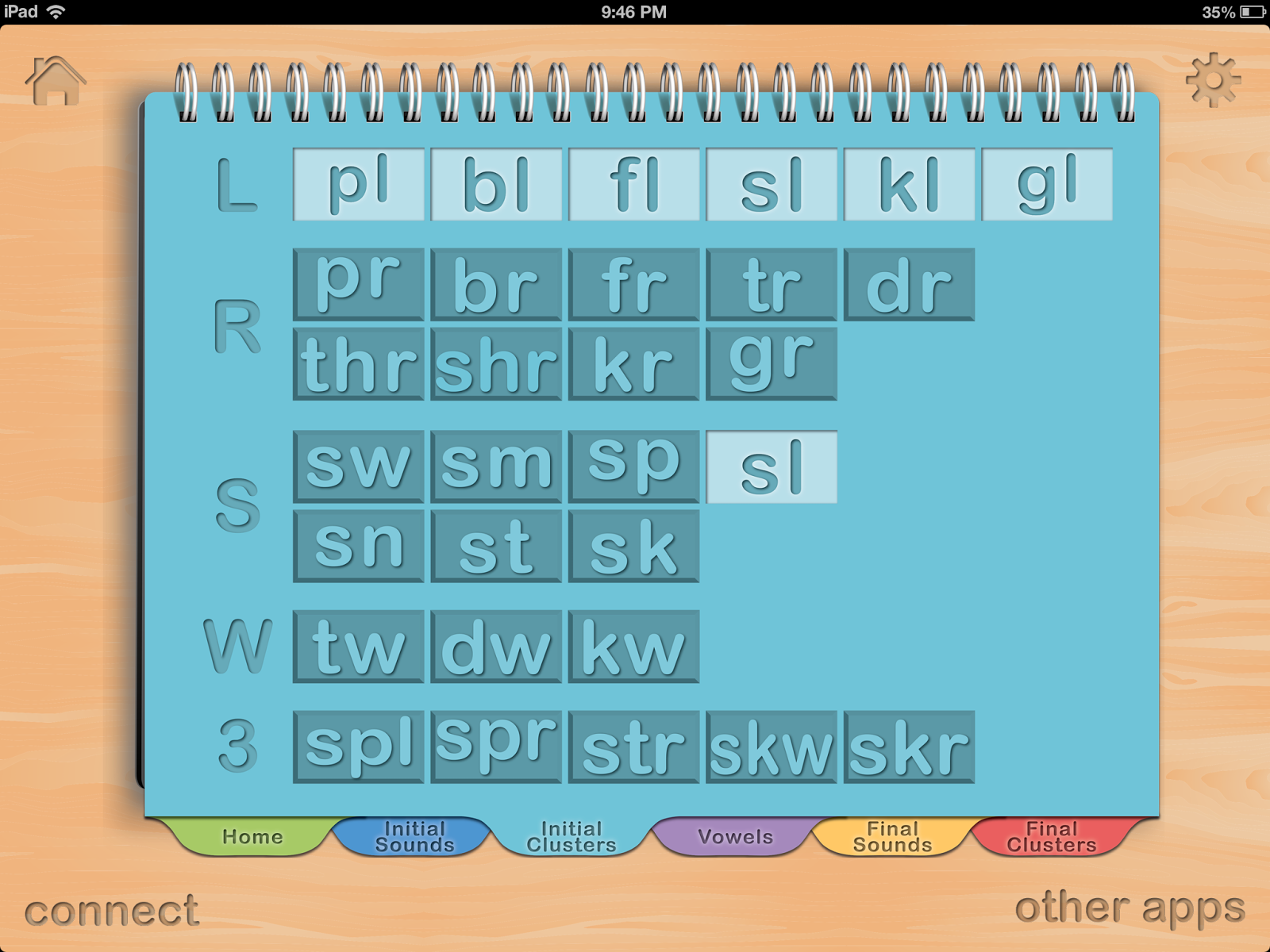
When you open the app, you can choose from the tabs at the bottom to select the sounds you want to address in your session.  The sounds you select are highlighted, the sounds you do not want to address are darkened.  In the picture below, I selected /l/ blends.  

I love how the sounds are organized! 


 It is easy to make your selections and begin working with your students.  As your students progress through the app, you can also edit the word list.  

After you choose your targeted sounds, you go back to the home screen and you can toggle between "sounds" and "words."  In "sounds," CVC words are presented.  You can flip by the initial, medial or final sounds.  It is like chaining in the Lindamood-Bell LiPS program.  For example, sl o p changes to fl o p, then to fl i p, then to fl i t, and so on, depending on which part of the word you flip.  There are no pictures, which is great for my older students and for students who are learning to read.  Children with motor problems also benefit from this, as they don't have a visual representation to remind them of their old motor patterns.  They have to say each sound slowly, which is so helpful for my students.  The sounds are also color-coded by position, making it easy to teach initial, medial, and final positions, as well as to cue your students in on which sound has changed.  My students also loved recording their productions as it provided immediate feedback about how they did.  

I would definitely recommend this app to anyone working with students who have apraxia, articulation/phonological delays, and reading deficits.  This app goes sraight to the top of my must-have speech apps!


Tuesday, March 5, 2013

Adorable dragon spatial concept and following directions activity

I am so excited about this activity!  With testing and annual reviews, it took me a long time to finish, but here it is!


I was searching for graphics, and I saw these dragons and fell in love with them.  I have had many students over the years who love dragons, so I decided I had to have them.  

Included in this packet are:

  • 2 sets of small spatial concept cards, one labeled, one unlabeled.
  • 10 large labeled concept cards.


  • Concepts targeted include:
   in, out, next to, between, under, on,
   behind, in front of, far, near

  • Question strips for identification of concepts.


  • Following directions cards for conditional, one-step, two-step, three step, and before and after directions.


  • Blank cards for writing your own directions.
  • Large dragons for Simon Says
  • Board Game –use your own pieces and dice.


There are so many ways to use this activity.  Play matching, memory, and Go Fish with the small cards.  Play Simon Says for following directions and practicing spatial concepts with the large dragons that are included.

I included a board game as well.  The small concept cards or the directions cards and sentence strips can be used while playing the game.  Use your own dice or spinner and game pieces.  If a student follows the direction or responds correctly to the question, they take a turn.  Whoever finishes first wins!

I hope all of you (and your students) will enjoy it!  Head over to my TpT store to get it: 
http://www.teacherspayteachers.com/Product/Dragon-Spatial-Concepts-and-Following-Directions-Activity

Friday, March 1, 2013

Thank you to my 350+ followers!

As a thank you to everyone, I am setting up my first rafflecopter giveaway.  Not being sure how to begin, I contacted Pocket SLP, and they graciously gave me a code to give away Pocket Pairs, an app that targets 12 common phonological processes.  There are modes for receptive and expressive activities.  When playing the "Receptive Mode," students need to choose the picture in the pair that uses their targeted speech sounds.  Students are prompted to listen for their sound, then tap the picture that has the targeted sound.  If correct, a check appears on the picture; if incorrect, an X appears.

In "Expressive Mode," the students are prompted to say both targeted words.  There are buttons for the student, parent, or therapist to use to track correct, approximate and incorrect responses.  Responses can also be recorded.

At the end of your session, you can click on the pencil to get your results.  Correct and incorrect responses are shown with percentages and examples of targeted words.  There is also a section for therapist comments.  I found this tool to be useful when showing the students how they did.  Since I have only had a day to use the app, I have not shared data with parents yet, but I really like the email and print options.  The data is shared in a table format with a written explanation, and gives suggestions for homework.  There is also room for the parent to comment as well.  This feature should definitely get the parents involved!

The giveaway runs today through midnight on Sunday.  Monday I will choose the winner.  Thanks again to everyone for your support!  It has been wonderful getting to know many of you, and I hope that you enjoy stopping by!


a Rafflecopter giveaway